5 Installing locally
Don’t Panic.
- Douglas Adams, The Hitchhiker’s Guide to the Galaxy
Everything in this chapter fits in one sitting, and the sitting ends with a test: you’ll ask your agent about something it learned an hour earlier, in a session that has never heard of it, and it will answer. Until that happens nothing is installed, whatever the package manager says. So the chapter is built backwards from that moment. Install the binary, wire the harness, give the agent a domain: three steps, the same three on every platform, and then the test.
If you skipped chapter 4, two words carry the chapter, and everything below makes one of each: a domain is a registered folder with a MANIFEST.md that says when an agent should look there (Section 4.1), and an engram is one markdown file of knowledge inside it (Section 4.2).
5.1 Install the binary
Crystalline is one binary, and it gets onto a machine the way that machine usually gets things.
Debian, Ubuntu and their relatives get a .deb for amd64 and arm64 from the releases page. It ships a systemd unit, installed disabled (chapter 16 turns it on). Windows gets an MSI that adds Crystalline to the PATH, upgrades in place and registers a task that starts the daemon when you sign in. If that task ever goes missing, crystalline doctor --fix puts it back. The Windows builds aren’t code signed yet, so expect a SmartScreen prompt and check the download against the SHA256SUMS file beside it (every release file also carries a build attestation that gh attestation verify checks, and SBOMs ship alongside). The bare binary ships for every platform too, and the macOS builds are signed and notarized. The permanent address for all of it is on the colophon page: https://github.com/jordiboehme/crystalline/releases/latest.
The standard Claude Desktop extension needs Crystalline installed first, Homebrew on a Mac and the MSI on Windows. Then download crystalline-claude-desktop-v<version>.mcpb from the same page, one extension for macOS and Windows on every chip, and in Claude Desktop open Settings > Extensions > Advanced settings > Install Extension… and pick the file. The extension carries no Crystalline of its own: it starts the one you installed, so that one is the only Crystalline you keep up to date. If none is there, Claude tells you in the chat what to install, and should the extension itself ever be too old for the Crystalline you installed, Claude says so too. On Windows the MSI and the extension need no terminal at all.
If you’d rather not work in a terminal and Claude Desktop on your own Mac is all you use, the Desktop-only bundle is the most elegant way in. Take crystalline-claude-desktop-only-v<version>-macos.mcpb instead: it carries Crystalline inside, and you update it by installing the newer bundle over the old one (Desktop has no in-app update for an extension). Desktop users can skip the terminal parts of what follows: the agent creates its first domain itself.
On a Mac with Homebrew the whole install is one line:
brew install jordiboehme/tap/crystalline5.2 First run
Nothing needs starting: the first agent that connects starts a background daemon (the one process that holds the index open), and every later agent, terminal and browser tab attaches to it. The one exception is the daemon of the Desktop-only bundle on a Mac: it stays tied to Desktop and exits five seconds after its last client disconnects, so with that bundle Fluid is there while Desktop is open. crystalline serve runs the same daemon in the foreground if you want to watch it, and crystalline serve --daemon in the background, but on a laptop most people never type either.
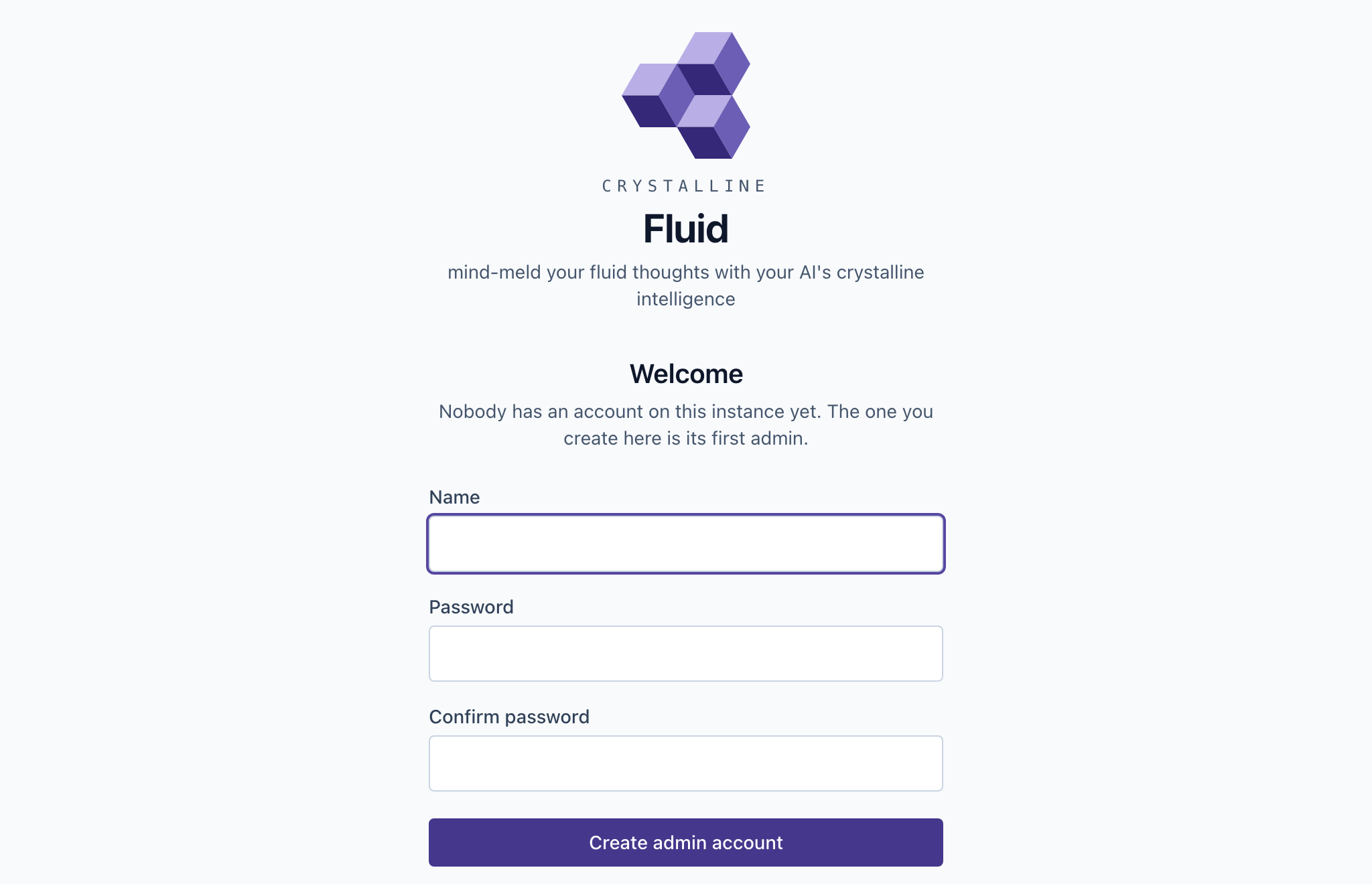
What you’ll type into is a browser: the daemon serves Fluid at http://localhost:7411 by default, however it was started. The first visit to an instance with no accounts yet is a short form, not a login page: pick a name and a password and you’re that instance’s admin, already signed in (Figure 5.1). You’re trusted to fill that form in because you’re on the machine: a connection from the machine itself needs no token, and a bind anyone else could reach gets a different treatment in chapter 16. Once any account exists the form is gone for good.
Semantic search wants one more download, the local embedding model (about 220 MB): the daemon fetches it in the background on its first start, and crystalline model download fetches it ahead of time. Until then search is plain text, which works, and finds only the words you searched for.
5.3 Onboarding a harness
This is the step that turns a binary into a colleague, and it’s one command per harness. Every part of what that command does is something a new hire gets on day one. It registers the MCP server with the harness, so the agent has the tools. In Claude Code, Codex and Copilot it writes three hooks. A session-start hook delivers the briefing on a fresh start, after a /clear and after a compaction. A stop hook is the once-per-session nudge from chapter 3 that asks the agent to capture what it learned before the session ends. A prompt hook hands the agent up to three engrams that may fit each prompt, named by address and each once per session (Claude Code and Codex use it; Copilot gets the entry and stays quiet for now). It also copies the six skills into the harness’s skills folder, the playbook that says when to use which tool. Cursor, Kiro, Gemini CLI and Qwen Code get the same skills and the session-start hook alone (Gemini CLI and Qwen Code run it on a fresh start only). Run it twice and the second run touches nothing.
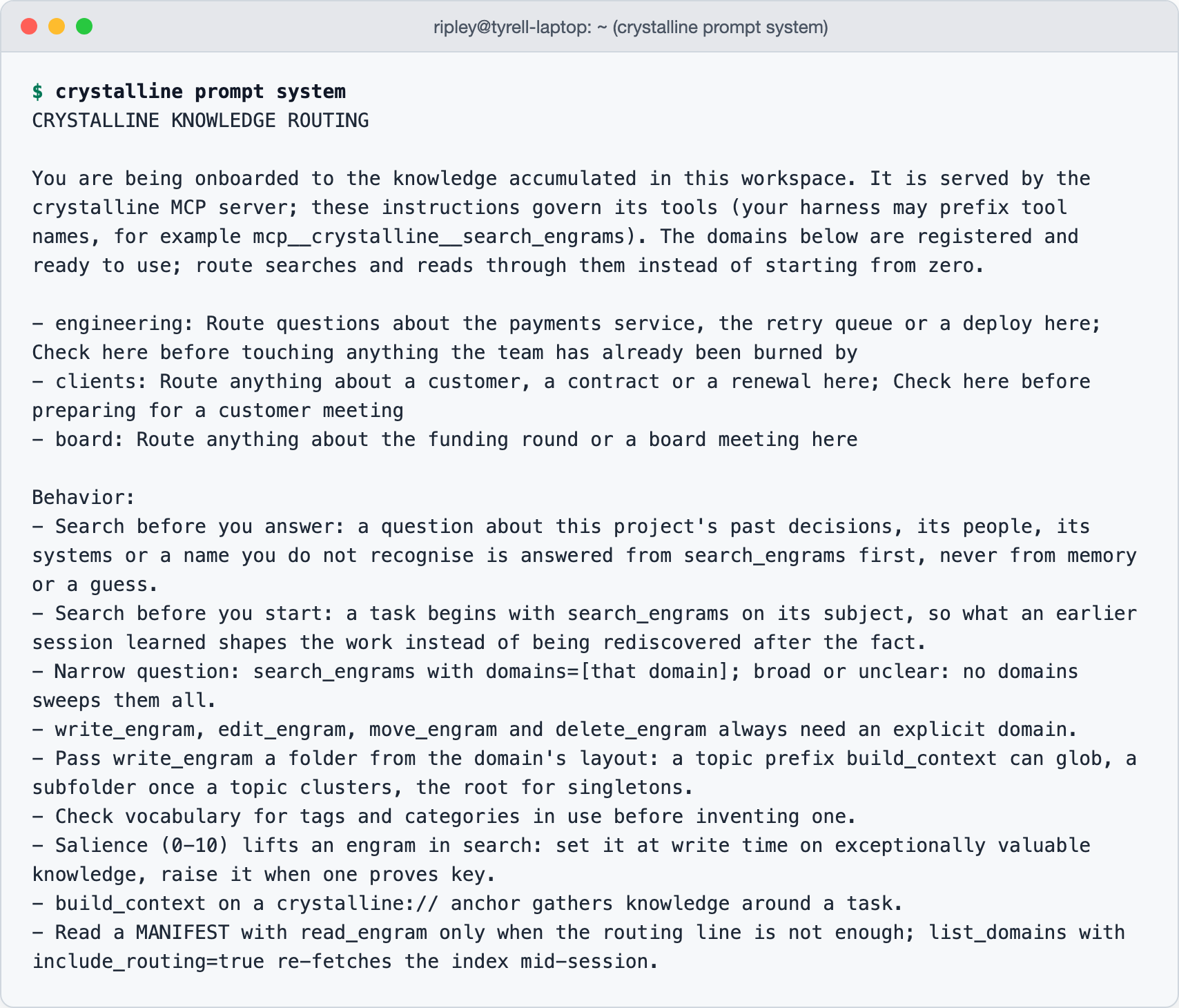
Look at the briefing once with your own eyes: it’s the whole of what your agent knows about you at the start of a session. crystalline prompt system prints it (Figure 5.2): an intro, the behaviour rules and one line per registered domain, drawn from the ## When to Use bullets of that domain’s manifest. The rules open with when to search (before answering a question about the project’s past and before starting a task) and then say how: a narrow question goes to the domain that owns it, a broad one sweeps all of them and a write always names its domain. On a fresh install the domain lines are empty, and that’s correct: the desk is set up and nobody has shown the new hire the filing cabinets yet.
Claude Desktop runs no hooks and needs none: its server delivers the same routing block as part of the MCP server’s instructions on every connection, and the optional companion skill from the releases page, uploaded under Settings > Capabilities > Skills, adds the capture and collaboration playbook on top. A chat client with no hooks that never shows the model a server’s instructions gets a standing instruction instead: crystalline prompt connector prints the paragraph to paste into its custom instructions, and the agent fetches its own onboarding with one list_domains call at the start of every session.
Install a second harness and you’ve added a door, not a second colleague. Claude Code in a terminal, Codex, the Copilot CLI, Claude Desktop and every other harness you install each spawn the same crystalline mcp over stdio. The first of them to connect starts the one daemon the rest attach to, so every one of them sees the same domains, the same index and the same briefing. Tell Desktop something over lunch and the terminal session knows it in the afternoon, with nothing copied and nothing configured twice. Desktop’s door can still stay shut: when the extension finds no Crystalline it can start (none is installed, the one installed is too old, or on Windows the daemon’s task is missing), it comes up with a single status tool whose instructions say what to install or run. Do that and restart Desktop, and the door is open again.
Claude Code takes one command:
crystalline install claude-codeCodex takes crystalline install codex and the Copilot CLI crystalline install copilot; Cursor, Kiro, Gemini CLI and Qwen Code take cursor, kiro, gemini and qwen. The MCP server it registers is crystalline mcp --harness claude-code. --skip-mcp, --skip-hooks and --skip-skills leave a part out, --project writes into the current repository’s config instead of your global one (Claude Code, Codex and Copilot only), and crystalline uninstall claude-code reverses the lot while leaving anything that isn’t Crystalline’s own alone. The install never edits an instruction file such as CLAUDE.md, AGENTS.md, GEMINI.md or QWEN.md: it touches only the harness’s settings and the files it creates itself. In the settings files of Cursor, Kiro, Gemini CLI and Qwen Code it changes only its own entry, and your other entries, comments and layout stay as they were. Before it first changes such a file, it keeps a copy under backups/ in the state directory, readable only by you. Cursor and the Kiro IDE may start with a short PATH, so their registration carries the full path of the binary instead of the bare name: run the install again after you move or upgrade the binary, and restart Cursor after the install so it loads the hook.
The install is recorded in a local receipt, and the receipt is what keeps a harness current: the first time a newer Crystalline runs, it refreshes the installed hooks and skills at session start (that’s how an older install picks up the prompt hook), updating changed skills (an edited copy is kept beside the new one as SKILL.md.bak) and removing any the new version no longer ships. The --harness flag in the MCP registration is the other half of the same idea. A crystalline mcp process started with it asks the receipt whether that harness has its hooks wired, and if so serves that session neither the skills over MCP nor a second copy of the routing block, since the harness already has both as files. That holds for Claude Code, Codex and Copilot, where a live check confirmed the harness loads both. Cursor, Kiro, Gemini CLI and Qwen Code aren’t confirmed yet, so their sessions keep the skills over MCP and get a short pointer that says to fetch the routing block if it didn’t arrive. Nothing in that decision comes from the connecting client: it’s settled before the session opens. A registration written by hand without the flag, or a remote client, is served the full surface, and skills.serve set explicitly to true or false makes every client identical.
5.4 The first domain and the first engram
Now the filing cabinet. Before an agent can keep anything it needs a domain, and this section runs the whole loop in miniature: the domain is scaffolded and registered, one fact is written into it as an engram, and a question phrased nothing like the fact gets that fact back. The last one is the semantic ranking at work, on a model the daemon fetched in the background when it started.
Where that folder lives is up to you, and it doesn’t have to be where any other domain is: a domain is registered by its own path, and nothing ties one registration to the next. engineering can sit in a git checkout under ~/knowledge, reading under Documents where the agent put it, a third on a NAS mount that is already backed up. All three are served by the one daemon and named in the same briefing. Documents/Crystalline is only the default for a domain an agent creates when nobody names a path, and the domains_root setting moves that default without moving anything already registered. A network share changes two things. First, the index stays in the local state directory, and should: it’s a database, and a database on a share is how people learn about file locking the hard way. The share holds the markdown and nothing else. Second, the daemon’s file watcher hears the machine it runs on, not the network, so an engram written into that folder from another computer shows up at the next crystalline sync or the next daemon start, not the moment it lands. Written through Crystalline from any harness on this machine, it’s indexed as it lands, share or no share.
Open the manifest before you go any further and make sure the ## Scope and ## When to Use sections say what you would say, because those bullets are the one line your agent reads about this domain at the start of every session. Write them the way you’d label a drawer for a new hire: “route questions about the payments service, the retry queue or a deploy here”. The agent drafts them from what you say, and you check them once.
It takes three prompts and no terminal:
You:    Set up a Crystalline domain called engineering in
        ~/knowledge/engineering. Its scope is the payments service:
        route questions about the payments service, the retry queue
        or a deploy there.
Agent:  Created and registered engineering. The manifest's Scope and
        When to Use sections carry what you just said, so your next
        session will see the domain in its briefing.

You:    Remember in engineering: the retry queue drops jobs older
        than 24 hours. It is a gotcha, tagged payments.
Agent:  Captured "Retry queue gotcha" in engineering, at
        ~/knowledge/engineering/retry-queue-gotcha.md.

You:    Why does the payments queue lose jobs?
Agent:  The retry queue drops jobs older than 24 hours, from
        "Retry queue gotcha" in engineering.
A Desktop user’s path is exactly this, and it works even without the first prompt: an agent that finds nowhere to write creates a domain itself under Documents/Crystalline, and the first engram lands there. Open the manifest afterwards and make sure the two sections say what you’d say.
The first prompt was three commands, the same three the manual’s terminal setup page starts with. domain init scaffolds the folder with a starter manifest and domain add registers it under the name the agent will use and indexes what is already there (there’s no separate sync step). The agent did the same through its own tools: add_domain to scaffold and register, then edit_engram on the manifest.
mkdir -p ~/knowledge/engineering
crystalline domain init ~/knowledge/engineering --name engineering
crystalline domain add engineering ~/knowledge/engineering
The second prompt was one command (the agent’s was one write_engram call), and running it by hand shows the file appear in the folder, retry-queue-gotcha.md, the file chapter 4 read line by line:
crystalline write engineering "Retry queue gotcha" \
  --content "- [gotcha] The retry queue drops jobs older than 24h #payments" \
  --tags gotcha,payments
The third prompt was a search, and crystalline search "retry queue" finds it as a plain text hit. On a machine where no daemon has fetched the model yet, fetch it, re-sync with embeddings and ask something the engram never says:
crystalline model download
crystalline sync --embed
crystalline search "why does the payments queue lose jobs"
crystalline sync is for files that arrive some other way (an editor, a git pull) when no daemon was watching, and crystalline status shows what got indexed.
5.5 Verifying the loop
Now the test. Start a session in your harness and ask about the retry queue without explaining anything. Watch what the agent does before it answers, because that’s the recall beat and it proves the wiring. In Claude Code or Codex the question arrives with the gotcha already attached by its address, and the agent reads it. Elsewhere it searches engineering, because the briefing told it that’s where the payments knowledge lives. Either way it answers from the engram, with the address in hand if you ask for it.
What that doesn’t prove yet is the capture beat, the one that matters over months. Tell the agent something it couldn’t have known, the way you did on chapter 1’s Monday:
You:    The cutoff is 24 hours because Encom's chargeback window is
        three days - the queue needs two days to notice a job. Remember
        that, and why.
Agent:  Captured: added the chargeback window as the reason to
        "Retry queue gotcha" in engineering, with a depends_on relation
        to a new "Encom chargeback window" engram. Want me to adjust
        the wording?
Close the session, open a new one (it has never heard of Encom) and ask why the cutoff is a day. If the answer names the chargeback window, you’re done: the agent looked something up that it learned in a conversation that no longer exists. It’s a Voight-Kampff test run in reverse: you’re not checking whether the thing across the desk is a replicant, you’re checking that it remembers.
Once the test passes, close the terminal. Nothing in daily use needs it: the agent recalls and captures through its tools, the daemon starts itself and the browser tab is there for the odd look at what the agent learned. The commands in this chapter were the installation, and from here on what you type is addressed to a colleague.
When it fails the fix is usually quick. If the agent answered from general knowledge, with no engram attached and no search, the session didn’t get the briefing: run crystalline prompt system yourself and check that engineering has a line (if it has none, the manifest’s ## When to Use section is empty). If the agent recalled the gotcha but not the reason, the capture never landed: look in ~/knowledge/engineering for the file and check that you said yes when it proposed writing. If nothing arrived with the question in Claude Code or Codex, check two things: the prompt hook stays quiet until the embedding model has loaded, and crystalline doctor says whether the hook is installed.
Your first afternoon is the five lines above. You run the brew line and the install line, domain init a books folder, and your agent’s first session opens with a briefing that names it and nothing else, because nothing has been taught yet. You tell it the series rule, the two shops and the press whose paperbacks you wait for, to see what happens, and close the session. In the next one you ask what to read, and it starts from your rules. In chapter 2 the bookseller took a year to learn you; the agent took a session. By Wednesday you have three doors open: Claude Code in the terminal, the Copilot CLI in a second terminal and Claude Desktop for the thinking you do away from the keyboard. Two crystalline install lines and one Desktop extension were the setup, and the daemon behind all three is the one that started that first afternoon. What you tell Desktop on Tuesday evening about the manga translations is what Copilot recalls on Wednesday morning, from the same file in the same folder, and nothing was copied between them.
Your sister, who has never opened a terminal on purpose, installs the Desktop-only bundle the same week. She has no domains, and her agent makes one the first time it needs somewhere to write, a reading folder under Documents/Crystalline. By Friday it holds four engrams about the Dungeon Crawler Carl books she’s lining up for the holiday, and she opens localhost:7411 to look at what her agent kept while Desktop is running. Two installs, one with a keyboard and one without, and the same loop runs on both.
The desk is set up, the drawers are labelled and the new hire has remembered one thing overnight. Everything after this is a matter of what you choose to teach.
Installing is three steps on every platform: install the binary (Homebrew, a .deb or an MSI, plus an extension for Claude Desktop, or the Desktop-only bundle on a Mac that runs only Desktop), wire the harness with crystalline install <harness> and give the agent a domain with domain init and domain add. The install writes the MCP registration, the session-start hook that delivers the briefing and the six skills, plus in Claude Code, Codex and Copilot the stop hook that nudges capture and the prompt hook that brings matching engrams with each question (in Claude Code and Codex; Copilot’s stays quiet), and it’s safe to run again. Nothing needs starting: the first agent to connect starts the daemon, which serves Fluid at localhost:7411, where the first visit creates the admin account. Every harness on the machine shares that daemon, and a domain is registered by its own path. The install is finished when a fresh session recalls something a previous one learned.