The moment to leave localhost is the moment two people want to correct the same engram. Up to then a laptop is the right size: one person, one agent, one folder, nothing to operate. Past it, every fact the team learns is being taught twice and drifting once, and the fix is the oldest one in computing. Put it on a server, give everyone a login and let one instance be the one the whole team teaches.
The questions arrive in a fixed order, and the chapter follows it: where the instance runs; who may sign in, and how, the question chapter 15 handed here; how an agent on somebody’s laptop proves who it acts for; how one person keeps a domain to a smaller circle; how the server reaches GitHub on its own; and how a laptop brings a server’s domains in beside its own.
16.1 When to move off localhost
Chapter 1 settled where Crystalline runs: on a machine of yours, never on a hosted service. This chapter is about which machine. Any one of four signals is enough. Somebody who never opens a terminal wants to read what the agents learned and fix a fact without asking. An agent runs somewhere that isn’t a laptop (a hosted runner or a bot with a task) and needs to recall and capture like everyone else. You work from more than one machine (or from a harness that can’t start a local binary) and want the same colleague on all of them. Or the same engram has been corrected on two laptops in two directions.
A shared instance differs from a team domain, chapter 17’s subject, where a folder lives in a GitHub repository, each person runs their own instance and knowledge travels between them as proposals the team reviews. A shared instance is one daemon everyone connects to: one index, one Fluid, one set of accounts, one folder of files on one disk. The two compose, and a mature team usually has both.
16.2 The shapes it takes
Three shapes cover almost every team: a container, a systemd unit on a Linux box and a read-only mirror of knowledge somebody else curates. The full guide is docs/deployment.md in the repository, one scenario per section with a diagram each, and this chapter summarizes it. The three reduce to one picture (Figure 16.1): the daemon on a server, teammates’ agents reaching it over MCP on HTTP instead of a local pipe, browsers reaching Fluid on the same port and, where the team configures them, a proxy in front and an identity provider beside it. The server can also live under a path of a host your proxy already serves, https://example.com/crystalline say, and laptops connect to that address as it is.
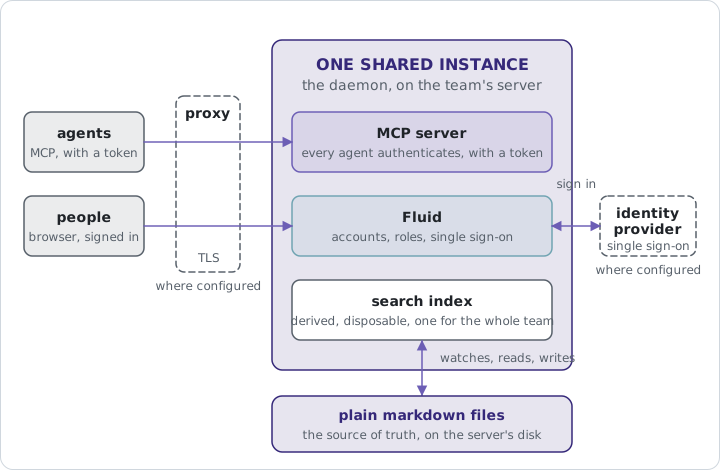
The team server is a container. The published image binds 0.0.0.0:7411 inside it, keeps the knowledge as a bind mount (so the files stay exactly the markdown they were) and puts the index on a volume:
docker run -d \
  --name crystalline \
  -p 7411:7411 \
  -v "$(pwd)/knowledge:/knowledge" \
  -v crystalline-data:/data \
  ghcr.io/jordiboehme/crystalline:latest
The with-model tag bakes the embedding model in, for a host with no egress. The same shape without a container is the .deb’s systemd unit: put CRYSTALLINE_SERVICE_HTTP=0.0.0.0:7411 in /etc/default/crystalline and run sudo systemctl enable --now crystalline. A scale-out variant serves Fluid from an nginx tier in front of the daemon, and a read-only shape, --read-only, serves knowledge curated as a reviewed repository: the writing tools vanish from what an agent is offered while the index keeps following every pull.
Whatever shape you pick, a few things follow you into it. An agent reaching the daemon by a hostname needs that name in CRYSTALLINE_SERVICE_ALLOWED_HOSTS, since the MCP transport checks the Host header against a loopback-only allow-list to block DNS rebinding. Serve it over TLS anywhere but localhost. Off loopback the session cookie is marked Secure, so a browser on plain http://team.lan won’t keep it. Every address the daemon builds for itself off loopback starts with https:// too, including the one an identity provider sends the browser back to, so single sign-on on plain HTTP is refused at the provider. And a proxy in front must forward Host verbatim, pass the WebSocket upgrade through for co-editing and accept 10 MiB request bodies, as the daemon does. It mustn’t buffer /api/ either, or Fluid’s live updates arrive only when the proxy’s buffer fills. Where the daemon can’t tell the address people reach it at (behind a proxy, in a container, with Fluid served from its own tier), service.public_url names it, and the links an agent hands out to engram pages start there.
A server under a path needs that setting: service.public_url carries the path, https://example.com/crystalline, and nothing else turns a prefix on. The proxy may pass the path through or strip it. Pass it through if you can, because nginx decodes an escaped slash in a permalink when it strips. Forward the bare /crystalline as well, without a redirect, since an MCP client never follows one. With OAuth on, a client looks for two documents at the host root, so forward /.well-known/oauth-protected-resource/crystalline and /.well-known/oauth-authorization-server/crystalline too. auth.oidc.redirect_uri, if you set it, carries the same path in front of the callback, or single sign-on stays off with a warning. Every cookie is scoped to the path, so two instances on one host keep separate sessions. The separate Fluid image takes the path as CRYSTALLINE_BASE_PATH. The “Under a path” section of docs/deployment.md has the proxy configurations and four lines that check the setup from outside.
16.3 Accounts and roles
Nothing is readable until an account exists. A fresh instance greets the first browser with the create-first-admin form from chapter 5, with one difference: a daemon bound to anything but loopback cannot trust a visitor by where they connected from, so it prints a one-time setup token as it starts and the form asks for it. Read it in docker logs crystalline, or journalctl -u crystalline under systemd; a restart prints a fresh one until the first account exists, and none after that. You can also choose the token yourself with CRYSTALLINE_SETUP_TOKEN, at least 32 characters long; the daemon then prints no token and keeps yours across a restart. The terminal route needs no token: crystalline users add ada --role admin writes the accounts database directly, and a running daemon picks the account up on its next lookup. A container can skip both: set CRYSTALLINE_ADMIN_NAME and CRYSTALLINE_ADMIN_PASSWORD_FILE, the second pointing at a Docker secret, and the first start creates that admin, as long as no account exists yet. The plain CRYSTALLINE_ADMIN_PASSWORD works too, but it shows in docker inspect. A login page that faces the internet gets guessed at. Failed sign-ins for one name slow down (one second, then two, four and eight, then a refusal that says when to retry), and every failure is logged with the account and the address it came from, which is what fail2ban reads.
There are four roles, each containing the one before: none sees no engram at all and is for somebody who works only on a domain’s reflections (Chapter 12); a viewer searches, reads and browses; an editor also writes and edits engrams; an admin also manages domains and users, from crystalline users or from Fluid. An agent acts for its account and is held to that account’s role: if you’re an admin, your agent can do admin things, and if you aren’t, it’s refused the way you would be. The network, the database and sign-in belong to whoever runs the server, though: no agent can change them, not even an admin’s, and they change only from the command line, in config.yaml or through the environment. Accounts live in a small database beside the index, never inside it, so no reindex can take them along; on the container it sits on the /data volume and no rebuild restores it, so back the volume up.
When somebody leaves, an admin disables or deletes the account, and deleting sweeps whatever the account had connected. That’s the whole deprovisioning story; there’s no directory sync and no SAML.
An agent that runs on its own, a build runner or a nightly ingest, gets an account of its own, and that account can carry a write list: the domains it may write to, each named or given as a prefix with *, like agents-*. Every other domain is read-only for that account, while it still reads every domain it can see, so many agents can share one server, each reading the company’s knowledge and writing only to its own domain. A list only takes rights away: a listed domain still needs the role and, for a private domain, the membership, so a viewer with a list still writes nothing. On a team domain under the server’s own GitHub App, write access on the repository takes the place of both.
crystalline users add bot --mcp-token bot --role editor --writes agents-bot creates such an account, crystalline users writes bot agents-bot,shared-agents replaces its list, crystalline users writes bot prints it and --clear removes it; crystalline users list shows every account’s list. There’s no control for it in Fluid. A name that matches no domain yet is accepted with a warning, and a domain rename updates the entries that name it exactly, never a * entry. A write outside the list is refused with a sentence that names the account and the command that changes its list.
16.4 Single sign-on
Local accounts are right for a team of nine. Inside a company that already has an identity provider, people should sign in with the login they already have, and Crystalline talks to the provider through one generic integration, OpenID Connect, with no adapter per vendor. The configuration is three required keys, auth.oidc.issuer, auth.oidc.client_id and auth.oidc.client_secret, plus four optional ones: a label for the button, the scopes, the role a first sign-in lands at and the callback address. That last one, auth.oidc.redirect_uri, is for a proxy that rewrites Host and won’t forward the public name; set it to the callback exactly as the provider has it registered. Discovery, PKCE and key rotation are the integration’s job. Fluid’s login page then shows “Sign in with” the label beside the local form (Figure 16.2), and both keep working, so an instance can run mixed: local accounts for bots and the break-glass admin, everybody else through the provider.
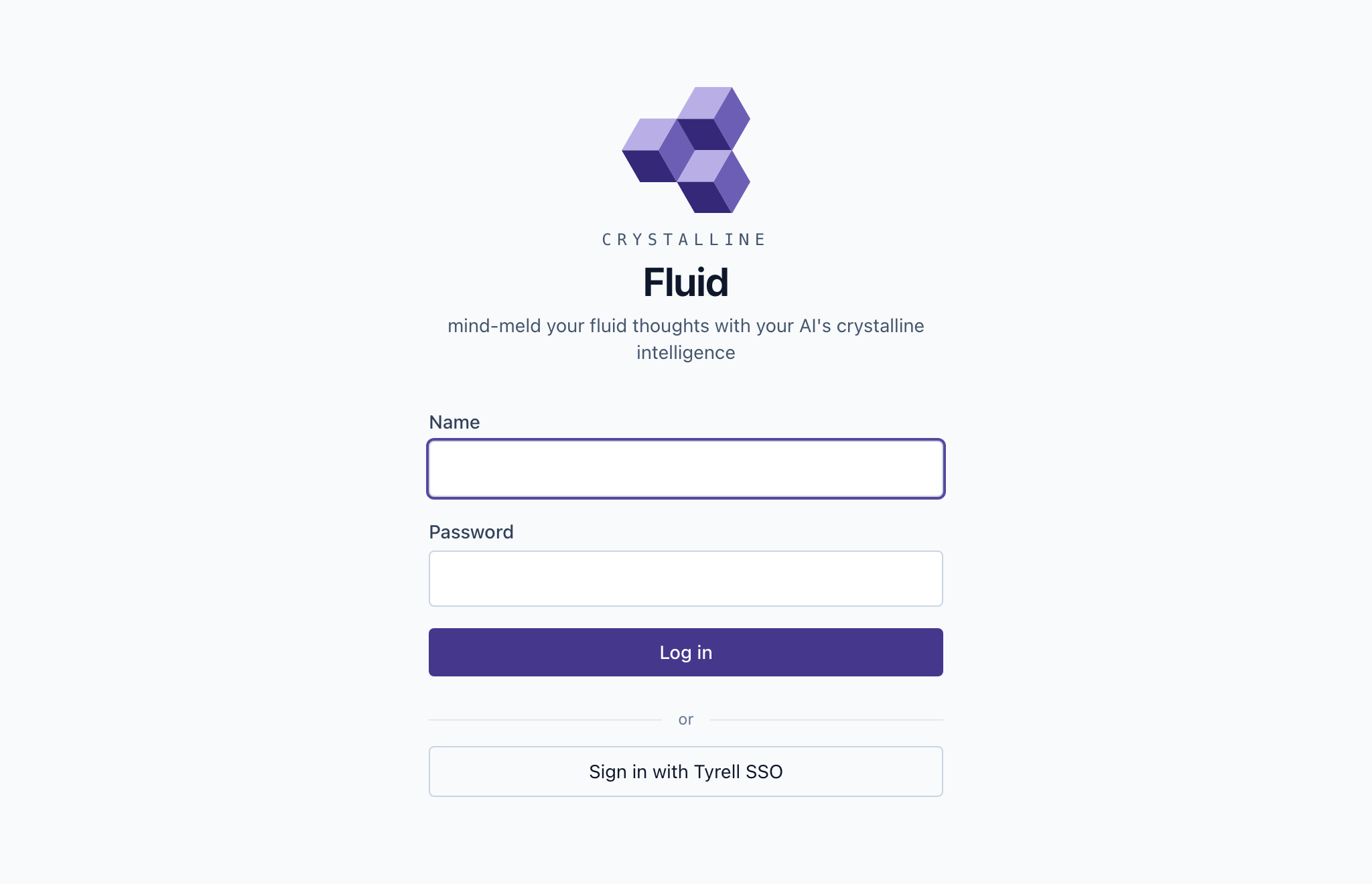
The first successful sign-in creates the account, named from the provider’s preferred username and made unique if it collides, at the role auth.oidc.default_role says, viewer unless you change it. What the account is keyed on is what most such integrations get wrong: the durable key is the pair of issuer and subject, the provider’s own stable identifier, never the username, the email or the display name. Those are presentation; rename yourself at the provider and you land in the same account with a new label. And there’s no silent linking: signing in through the provider with an email that matches an existing local account gets you a fresh account, never the existing one, and linking the two is an explicit act by the signed-in local user or by an admin. The provider authenticates and Crystalline authorizes; a group at the provider doesn’t become a role here.
Microsoft Entra publishes a tenant-independent discovery document whose issuer field carries the literal text {tenantid}, and an issuer check against that template fails for every token. Crystalline refuses that value and the shared endpoints such as common at configuration time, and names the fix: the issuer must be your tenant’s own https://login.microsoftonline.com/<your-tenant-id>/v2.0. Register a client secret, because that’s the one credential Crystalline speaks. And Entra’s subject identifier is pairwise per app registration, so re-registering the application breaks every link between provider identities and Crystalline accounts, and an admin has to re-link them.
16.5 Trusted-header mode
Some deployments already have a proxy that authenticates everybody and names the arrival in a request header, and Crystalline can consume that. auth.trusted_header names a single custom header, remote-user say, and an account it names is created at viewer role the first time it’s seen.
A second form, auth.proxy_headers, takes the standard set that forward-auth proxies emit (Remote-User, Remote-Name, Remote-Email and Remote-Groups), using the first for identity, the next two as presentation and reading the groups without acting on them. A name that arrives this way gets an account of its own, at the role auth.oidc.default_role says, never the local account of the same name. A forwarded ada beside a local ada becomes ada-2, under the same no-silent-linking rule as single sign-on. Pick one form or the other. With both set, the HTTP surface refuses to start and a warning names both keys, while the daemon itself keeps running and a stdio session never notices. Both are off by default, and a header that arrives while the mode is off buys the sender nothing.
The documentation doesn’t soften the warning, so neither does this page. Header mode trusts the proxy completely, because a header is a line of text anyone can add to a request. It’s safe only when Crystalline is unreachable except through the proxy, and the proxy strips any client-supplied copy of those headers before setting its own. A daemon reachable on its port directly is an instance where anybody can be anybody. If you can’t say with confidence that the only path to the port runs through the proxy, use single sign-on instead. And create the first admin before the proxy goes in front: a request carrying forwarding headers is never counted as local, so the setup form behind a proxy asks for a token that a loopback-bound daemon never printed.
16.6 Agent authentication
On a laptop the MCP endpoint is open, on loopback, to whatever local process reaches it, and that’s the right trade for one person. On a shared instance turn on agent authentication (auth.mcp), and from then on every agent that connects over HTTP identifies itself, exactly as a person does, with a token or by signing in. There’s no half-way tier: a connection without credentials is refused before any session opens, with a message naming how to get one; HAL refused Dave with less courtesy. The open tier exists only on an instance that leaves the setting off, and sees only the domains everyone sees. A server with its own GitHub App (below) is the exception: there the open tier acts on the team domains as the account github.agent_identity names, private ones included and at most as an editor, or as an anonymous visitor when the setting names nobody, which is one more reason to turn agent authentication on. An agent that could search a shared instance anonymously would be a colleague with no name on the commit. That’s the whole setup, by the way: create the first admin, turn on agent authentication, done. Everything after this section is what you can add, not what you must.
The credential is a token that belongs to a person. Each user issues their own in Fluid, under the Agent access card on their profile, or an admin mints one for any account with crystalline users mcp-token <name>; either way it’s shown once, and the instance keeps only a hash. It travels as an Authorization: Bearer header on the server’s entry in the harness’s MCP registration, never expires on its own and stops working the instant it’s revoked or rotated, because every request looks it up. Every account may issue one, viewers included, and that’s safe because of what the token means. Issuing one still works on a read-only instance, since a token is account state rather than knowledge (the sign-in path below is served there for the same reason); a read-only server with auth.mcp on is where an agent can’t connect at all until somebody issues it one.
What it means is that the agent is its user. It sees what that person sees, writes where that person may write, shares under that person’s identity when a team domain is involved, and the engrams it captures record which client acted for which account. A viewer’s agent is therefore read-only with nothing further to configure, and a leaked token names one person, whose one token is revoked. One caller needs no token: the CLI and a stdio session on the server itself are the machine’s owner and see everything, which is the honest statement of what a filesystem already permits.
16.7 A team of one
Nothing about a shared instance says the team has to be bigger than you. Put the daemon on a machine of yours that stays on (the box under the desk, a Raspberry Pi, a small VPS, the NAS that already holds the domains) and sign in to it from wherever you happen to be talking to a model: Claude Code on the laptop, Codex on the desktop, the Copilot CLI at work, a chat website in the browser, the app on your phone. Each of them asks you to sign in once and is the same colleague from then on. Chapter 5 gave you one colleague per computer. This gives you one colleague. It also makes the knowledge yours in a way a vendor’s chat history never is: switch harness, switch model, switch provider, and the domains don’t notice, because they never lived with the model.
Your phone has never seen your books folder. On Saturday, in Capsule Corp Books, you pick up a Star Trek novel you don’t recognize, open the chat app, sign in to the instance at home once and ask whether it’s one you have. The answer comes from the shelf engram your agent keeps per series: it’s the second volume of the Destiny trilogy, you own the first and the third, and the note from two winters ago, made on the laptop through Claude Code with the date on it, says you stopped at the end of the first because this one was out of print. Nothing was copied anywhere, and the phone and the laptop share one colleague.
That evening you open Codex on the laptop, sign in to the same instance and mark the trilogy complete on the shelf. On Sunday the phone knows, with Codex recorded as the client that acted for you. The colleague learned from two devices in one weekend, and the provenance says which of them acted each time.
One setting carries it. auth.mcp makes every remote session identify itself, and on an instance that serves Fluid that alone lets a client with nowhere to paste a header sign you in instead: the instance announces itself as a protected resource, the client registers on its own, sends you to sign in and asks your consent once, and from then on holds a credential the same gate checks on every request. The sign-in is whatever the instance already has, a local account, the company’s identity provider or the proxy in front. The switch behind it is auth.oauth, which follows auth.mcp unless you set it, and false turns the sign-in path off while tokens keep working. A harness that can send a header can use a personal token instead, issued once from your profile in Fluid and carried as an Authorization: Bearer cmt_... header on an entry of type http. Either way a session belongs to the account that opened it. A remote session is also served the skills over the wire (the skills tool and the skill:// resources), because nothing on the server knows what your harness has installed; a stdio session that chapter 5’s install wired already has them as files. Set skills.serve to true or false to make both transports behave the same. The consent page is Fluid’s: one Allow or Deny for the whole account. Your profile lists every client you connected, with a Revoke beside each.
16.8 Private domains
The first rule of a private domain is: you do not talk about the private domain. The second rule of a private domain is: the instance DOES NOT talk about the private domain.
- with sincere apologies to Chuck Palahniuk
By default whoever may sign in sees every domain. Some knowledge belongs to a smaller circle (what the agent learned about a funding round, or one person’s work on a company-wide instance), and a domain can be made private. It’s then visible to its owner, to the instance’s admins and to whoever the owner invites, each member at one of four levels: none sees no engram and works only on the domain’s reflections, a viewer reads and searches, an editor also writes and a manager also runs the membership. The owner is one person, and only the owner or an admin changes the domain’s visibility, transfers it or deletes it. Transfer is how a private domain survives its owner leaving.
Two truths belong here, and the second is printed under the Make private button so nobody discovers it later. Instance admins see and administer every domain, private ones included. And a private domain protects its contents from the instance’s other users, not from whoever operates the machine, because the engrams are files on that machine’s disk, with no encryption at rest. If the threat is the operator, the answer is a different machine.
Visibility follows the caller onto every surface: search, reading, build_context, the routing briefing, the graph, the maintenance sweep, exports and Fluid’s domain list all show a private domain only to those who may see it. To everyone else it doesn’t exist, literally: a search or a read against a domain you may not see answers exactly as it would for one that was never registered, because a “forbidden” would already say something. That’s the second rule. A write has to pass both the membership level and the instance role, and the lower of the two decides. An instance editor invited as a viewer is told, when they try, that editor access is what the domain requires; an instance viewer invited as an editor is refused all the same, because an invitation widens what an account may see, never what its role lets it do. On a team domain under the server’s own GitHub App the membership and its levels don’t count: the person’s role on the repository decides (Chapter 19), and the instance role doesn’t cap a write (an instance role none still gets nothing). Members are managed from the Members section of the domain’s settings in Fluid, or on the server with crystalline domain members <domain> add <user> --level editor and its list and remove siblings. Further down, in the Danger zone, sits the switch between private and shared, which asks you to type the domain’s name first. The settings are one screen per domain, opened from the More actions menu on the domain’s page, and they hold everything an admin or an owner touches only now and then: members, review mode, the domain policies, provisioning, tag aliases, kept texts, the backup and the Danger zone. A domain that should be private from the first minute is registered that way, with crystalline domain add <name> <path> --private --owner <account>. Agents inherit all of this from their user and administer no membership; there’s no tool for changing one, on purpose. An agent may take two domain-level acts. It may unregister a domain: remove_domain works for an instance admin or the private domain’s owner and refuses an open tier outright. It may also change the domain’s policies and rule overrides with configure, under the same owner-or-admin rule. Membership records live in the accounts database beside the index, so a wipe and resync of the index leaves every permission where it was.
Your household moves off the laptop after the second time you and your partner corrected the same engram in two directions. You put Crystalline on the box under the desk, create the first admin, make an account for your partner and one for the teenager, and everybody signs in on Sunday. You promote your partner to editor. Then you turn on agent authentication. Your partner’s agent, pointed at the server across the network, is refused at once with a message saying where to get a token; she issues one on her profile, pastes it into her agent’s settings, and her next session opens with a briefing that names books and shops, learned by both of you, recalled by hers.
You keep a gifts domain for December. You make it private and invite your partner as a viewer, so her agent can read the list too and no other agent can. The teenager’s agent, asked what’s under the tree this year, searches every domain it can see and reports that nothing is known; yours, acting as you, finds the list at once; your partner’s, trying to add a hint of her own, is told her membership is viewer and proposes writing it to books instead. That’s one household, one instance and one folder of files on one disk, and every action in it has a name attached.
16.9 The server’s own GitHub App
A team server that reaches GitHub with one person’s sign-in lends that person’s access to everybody. The day they leave and their sign-in goes with them, the server loses its way into the repositories, and every team domain on it stops pulling and sharing. A GitHub App of the server’s own takes the person out of that picture. The App reads, pulls and shares each team domain with a short-lived token for that repository, so nobody’s private access is on the line. It also changes who may do what: on a server with an App, each team domain follows its repository on GitHub, and a person’s role there decides what they may do with the domain here (Chapter 19 has the rules).
You create the App from Fluid. Signed in as an admin, open GitHub settings and press Create GitHub App, naming the organization that should own it unless it’s your own account. GitHub asks you to confirm and sends you back, and Crystalline keeps the App. An App made this way can be installed only on the account or organization that owns it, so create it as the account that holds the team’s repositories. Then press Install on repositories and choose the repositories of your team domains and nothing else, because the App can reach every repository it’s installed on. A team that already has an App, or keeps its servers as code, brings that one instead, from a terminal or through the environment, and the health check tells you whether GitHub accepts it. It works the same with GitHub Enterprise Server. People link their own GitHub account once, from their profile.
Creating the App needs github.enabled and service.public_url, the address people and GitHub reach the server at. An address on loopback, a private network or a host name without a dot gets an App without a webhook, and then a change of access on GitHub takes up to five minutes to arrive. In the App’s settings on GitHub, enable Device Flow, so people can link GitHub from a terminal as well; Crystalline can’t switch it on for you. The Create button is there only while no App is configured.
To bring an App, crystalline github app set --app-id <id> --client-id <id> --private-key-file <path> saves it, with --client-secret-file and --webhook-secret-file when it has those secrets (linking in the browser needs the client secret, and an App created in Fluid has it). Secrets are read from files, never from the command line. crystalline github app status shows the App and crystalline github app remove deletes it. For infrastructure as code, the CRYSTALLINE_GITHUB_APP_* variables carry the same App (Chapter 23); they win over a stored App, and while they’re set set and remove refuse. crystalline doctor checks the key, this machine’s clock, the installations and the App’s four permissions, and names each closed domain with the reason (Chapter 19). For GitHub Enterprise Server, set github.api_url to https://<host>/api/v3.
GitHub sends its webhook to /api/v1/github/webhook, which needs no sign-in, so an authenticating proxy in front must let that one path through. Keep the origins/ folder of the state folder (in a container it’s on the /data volume) across restarts and upgrades: it records which repository each domain belongs to and, without a keychain, the App and everybody’s GitHub links. The section “Team server with a GitHub App” of docs/deployment.md in the crystalline repository has the full setup.
16.10 Domains from shared servers
So far this chapter has pointed an agent at one Crystalline, the one on your laptop or the server. Most people want both, books on their own machine and the team’s knowledge on the server, side by side in one session. Your local Crystalline does that by connecting to the server and offering the server’s domains beside your own. Larger organizations connect more than one: a company runs a server per department and one for everybody, and an engineer’s laptop brings in the department’s domains and the company’s next to the engineer’s own. A server like that usually offers far more domains than one person uses, so you can take only the ones you need: a domain you leave out never reaches your agent and hides nothing on your laptop.
The harness, the hooks and the command line keep talking to the Crystalline on your laptop as they do today, and that one holds a connection to every server you added (Figure 16.3). The briefing at the start of a session names the server’s domains too, the engrams that arrive with a prompt can come from either side and the reminder to evolve at the end of a session counts the server’s domains as well. A server that can’t be reached (the VPN is off, the hotel network blocks it, the laptop has just woken up) is left out quickly and named in the answer, with no request to sign in again, and comes back with its next answer.
Every domain has exactly one source, your laptop or one server, and a write always goes to the place that owns the domain. Nothing of the server’s knowledge is kept on your disk beyond a few small cached answers, such as the briefing lines. Your agent still gets a server domain’s images and files when it reads them. The server still decides what you may do: it answers your laptop as your account, with your role and your memberships, and it records which agent acted for you, just as when your agent signs in to it directly.
When a server uses a name your laptop already has for another domain, Crystalline settles it when the domain arrives, never while the agent works. Every domain gets one name on your machine, so the agent never has to say which server it means, and a name, once given, stays.
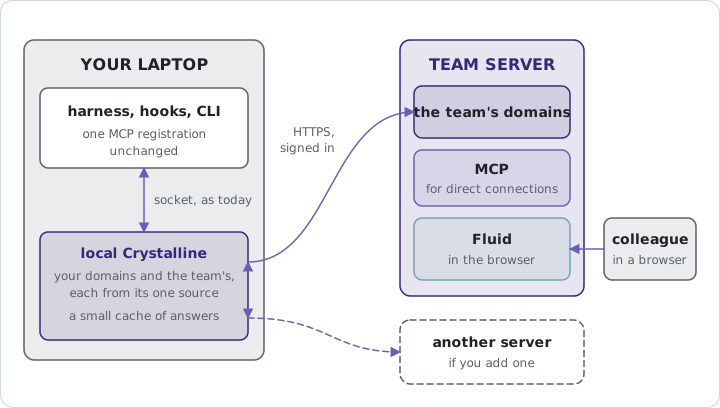
The book club keeps club on a server you run, and your laptop keeps books and shops. You connect your laptop’s Crystalline to the server and sign in once in the browser with your own account, and the next morning your agent’s briefing names the club’s domains beside books and shops. You ask what the club reads next and whether to order it. The agent finds the pick in club, a Gibson for June, and your rule in books: no hardbacks, because a hardback doesn’t survive the backpack. The paperback is out in May, so it says to wait. When Kane connects his laptop the same evening, his briefing names club but not committee, which lives on the same server, because the server answers as him and he isn’t on the committee.
At the meeting the club moves the Gibson to July, and on the way home you tell your agent. The change to club goes to the club’s server under your name, with your agent recorded as the one that acted. Your laptop also holds club from the club’s repository, and while you’re connected that copy steps aside and the server answers in its place; it comes back when you disconnect.
crystalline connect <url> adds a server as a source, and the server has to run Crystalline 0.23 or newer: connect refuses an older one. It keeps the whole address, path included, and follows no redirect, so give it the address the server answers at, https://example.com/crystalline for a server under a path; two paths on one host are two sources, each with its own sign-in. It checks the server first, refuses plain http:// anywhere but loopback and signs you in through the browser, the same sign-in the team of one above uses, so the server needs auth.oauth on (it follows auth.mcp). On a machine without a browser, --token takes a personal token instead, typed at a prompt or piped in, never on the command line, and a server without the sign-in path gets the same with a message saying so. The source is named after the most specific word of its host that isn’t a generic one like crystalline, unless --name gives it another, and that name appears only in notes and in local names. --domains alpha,beta takes only those domains, by their names on the server, and --all-domains takes every one again.
A domain from a server keeps its name unless your machine already uses it, and then it gets the local name <domain>-<source>: connect says so, status keeps showing it and crystalline domain rename <name> <new> --local changes it (Chapter 18). Whoever comes later gets the suffix, so no name changes on its own: a domain that appears on the server next month becomes <domain>-<source>, and a local domain you add after the mount becomes <domain>-local (then -local-2). When your laptop holds its own copy of a team domain the server also serves (the same repository, folder and branch) and you take it from the server, the server wins and its copy is used under that name. Yours is hidden while you’re connected, with its files untouched, and comes back after you disconnect. connect warns when the hidden copy holds changes you haven’t shared yet, so share them first.
crystalline disconnect <name> removes a source with its sign-in, its cache and its domains, and revokes the sign-in on the server when it can reach it. A pasted token is yours, so it’s only forgotten here. crystalline status and crystalline doctor list every source: its address and account, how it signed in, whether it answers, which domains it takes, the domains it brings, the local names and the hidden copies. doctor also says when the sign-in expires and counts a server that doesn’t answer as a problem. When a sign-in can’t be renewed, that one source asks you to sign in again with connect, while your own domains and the other sources keep working. For CI and containers, CRYSTALLINE_REMOTE_URL and CRYSTALLINE_REMOTE_TOKEN add one source from the environment. CRYSTALLINE_REMOTE_DOMAINS gives it the list --domains would. The account for such a runner is made on the server with crystalline users add agent-build --role editor --mcp-token build-runner, which prints its token once (--json for a script).
When the agent names one domain, the call goes straight to that domain’s source, and for a server’s domain that’s one network hop. A call over every domain (a search without domains, recent_activity, list_domains, evolve_engrams without a domain) asks all sources in parallel and gives each one at most three seconds, set by remote.deadline_ms. A server that misses it is left out and named in the answer, and a hidden local copy never stands in for it. A call to one domain waits at most ten seconds (an evolve sweep two minutes), a server that failed is skipped for thirty seconds and nothing is queued for it. Recall still gets one second, shared by all sources. Each server’s briefing lines are cached, so a server that can’t be reached still appears at session start, with a line saying it may be out of date. A delete or an acknowledgment sent to a server runs as typed, without the usual question back.
On a server’s domain your agent can co-edit with a person and open a share-link. build_context lists a relation into another source’s domain without following it, and the six collaboration tools of chapter 17 (share_changes and the rest) refuse a server’s domain and say to share changes on the server. Of the ways an agent reaches your laptop’s daemon, only the usual stdio registration (crystalline mcp) sees a server’s domains: an MCP session over HTTP or a REST call on your laptop’s own daemon never uses your sign-in. The local Fluid shows only your own domains and lists the server’s with a link to that server’s Fluid.
Somebody has to be the one who runs the server, and the rest of the team gets to forget it exists. That’s the whole point of a shared instance: one place everybody teaches, and one login that says who did.
Move off localhost when a team wants to teach one knowledge base: run the container, the systemd unit or the read-only shape from docs/deployment.md, serve it over TLS and create the first admin with the setup token the daemon prints, with crystalline users add or from the environment. Accounts come in four roles, none, viewer, editor and admin, created locally or on first sign-in through any OpenID Connect provider, keyed on issuer and subject and never linked by email; trusted-header mode is safe only when the proxy is the only path in. With agent authentication on, every agent over HTTP acts as its user, with a per-user token or a sign-in, and there’s no unauthenticated tier beside it; the first admin and that one setting are the whole setup, and a GitHub App of the server’s own, created in Fluid or brought along, makes each team domain follow its repository. A private domain is visible to its owner, the instance’s admins and invited members on every surface, and it protects from other users, never from whoever operates the machine. One person on several machines is a team of one: sign in once from every harness, chat website or phone, and it’s the same colleague everywhere; a laptop can also bring a server’s domains in beside its own.