17 Sharing with a team
The first pull request a new hire opens gets reviewed. So does the five-hundredth, and nobody minds, because review was never about doubting the person. It’s how a team lets anyone change what everybody depends on, with a way back when the change was wrong. An agent that captures into a domain every agent on the team reads from is in that position exactly, and it deserves the same treatment. It can be wrong the way a person can, so it proposes the way a person does, and what it proposes lands, by default, only after somebody looked. That’s also what separates a knowledge base from a pipeline that ingests whatever it’s fed. What reaches everyone’s agent here is meant to be useful and to make sense, because an agent acts on a wrong fact as readily as on a right one. Crystalline names both halves of the review: proposals are the review, and review mode is the workflow with a way back.
Chapter 16 built the shared instance. This chapter is what a team does with a domain, on one instance or on nine.
17.1 A domain on GitHub
A team domain is an ordinary domain whose files also live in a GitHub repository. The markdown on your disk stays the source of truth on your machine, and an origin records which repository, subfolder and branch it tracks.
Connecting takes three prompts and a browser tab. No git, no SSH key, no local clone: Crystalline talks to GitHub’s API directly. A teammate who’s never typed git gets through it in chat, knowing nothing about cloning or the command line. This is the whole of the setup:
You:    Configure crystalline to set GitHub enabled to true.

You:    Connect crystalline to GitHub.
Agent:  Open https://github.com/login/device and enter the code
        WXYZ-1234, then click Authorize on the page that follows
        and grant access to the tyrell organization. The sign-in
        stays pending until you do. Tell me when you are back.

You:    Add the following domains from GitHub:
        - github.com/tyrell/engineering-knowledge/tree/main/knowledge
          as domain engineering
        - github.com/tyrell/payments-knowledge/tree/main/knowledge
          as domain payments
        - github.com/tyrell/clients-knowledge/tree/main/knowledge
          as domain clients
Each domain comes straight from GitHub’s API, with no clone and nothing to unpack, and the subfolder in the address is the one the domain lives in when the repository holds more than knowledge. The name after “as domain” is optional: a repository that declares a name in its manifest brings it along, the same on every machine (Chapter 18), and one that doesn’t takes the repository’s name. One warning belongs here. A first index of a large team’s knowledge isn’t shy about CPU: kick it off before lunch and expect the fans to spin for a while before every domain is fully searchable. Plain text search works on each domain the moment it lands, and semantic ranking follows as the embeddings finish. On a team server with its own GitHub App (Chapter 16), connecting a domain also asks who may read it, everyone signed in or only the people with access to the repository, and nothing is chosen for you, so nobody opens a confidential repository by accident.
Those were two configure calls, the second with connect: "github", and one add_domain per repository. Ask again while a sign-in waits and the answer says how long the code has left, which is how you tell a slow teammate from a stuck flow; restart: true on the same call abandons a stale code and mints a fresh one. From a terminal the same three moves are two commands and a line per domain. crystalline config set github.enabled true turns team domains on. crystalline connect github prints the same short code to confirm at github.com/login/device. Entering the code isn’t the last step: GitHub shows an Authorize button after it, and the sign-in stays pending until that’s clicked, so closing the tab early leaves it waiting. A landed sign-in is listed on GitHub under Settings > Applications > Authorized OAuth Apps and never under personal access tokens, so check or revoke it there. Then one line per domain:
crystalline domain add engineering \
  --origin tyrell/engineering-knowledge/knowledge --branch main
The domain is downloaded and indexed at once, to learn from and to share back to. Point the same command at a folder that already holds knowledge, or at a registered domain with no origin yet, and it connects in place. Local files are never overwritten, and any that differ from the repository become local changes to share.
Turning the setting on makes six tools appear beside the twenty-four of chapter 15: origin_status, update_domain, share_changes, resolve_conflict, withdraw_proposal and discard_changes. While it’s off they aren’t listed at all. Calling one by name answers with the configure call that turns collaboration on. The collaboration skill sets the rhythm: before deep work in a team domain, origin_status, and if the domain is behind, update_domain first, so nobody builds on stale knowledge.
17.2 Proposals are the review
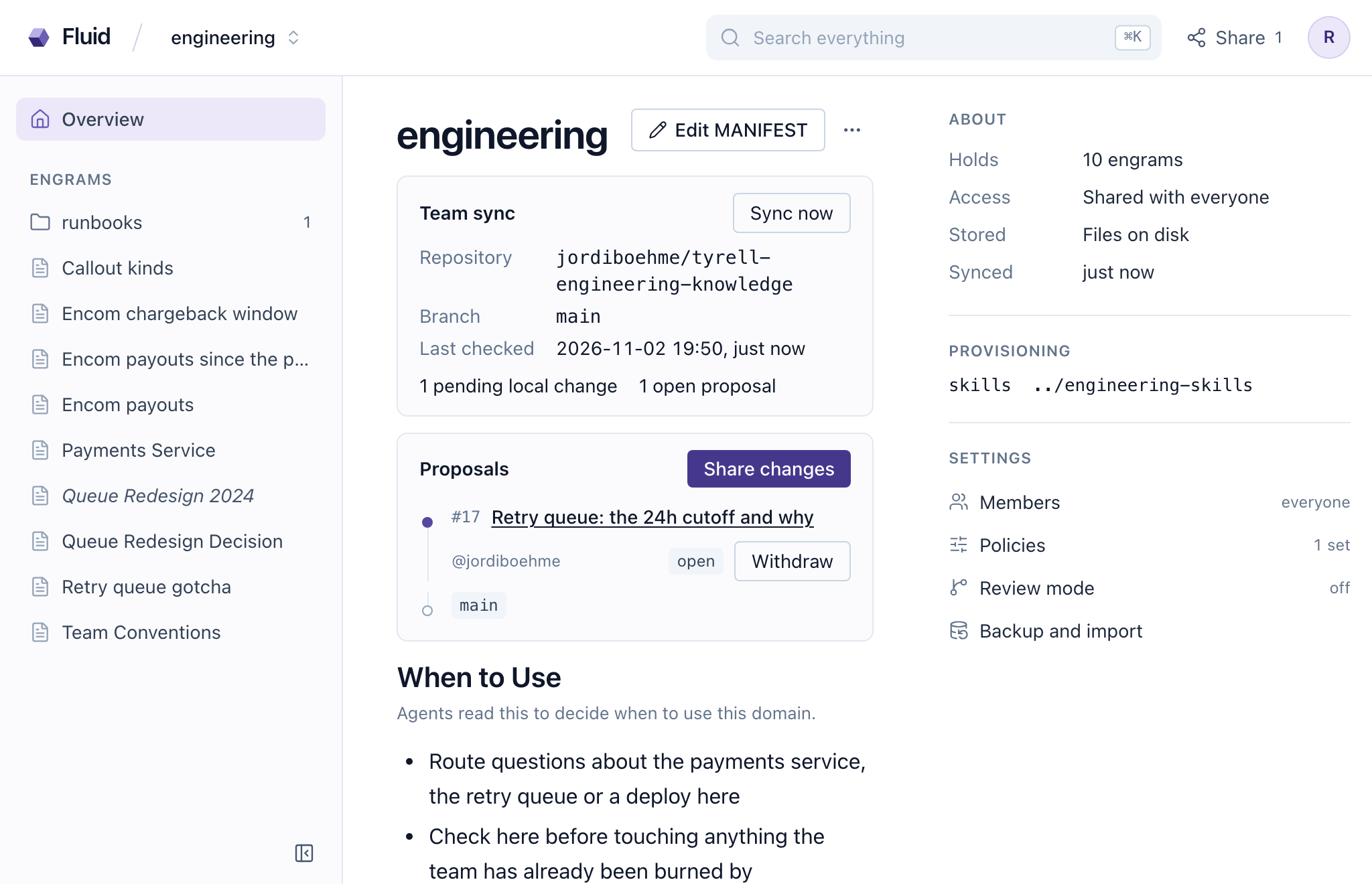
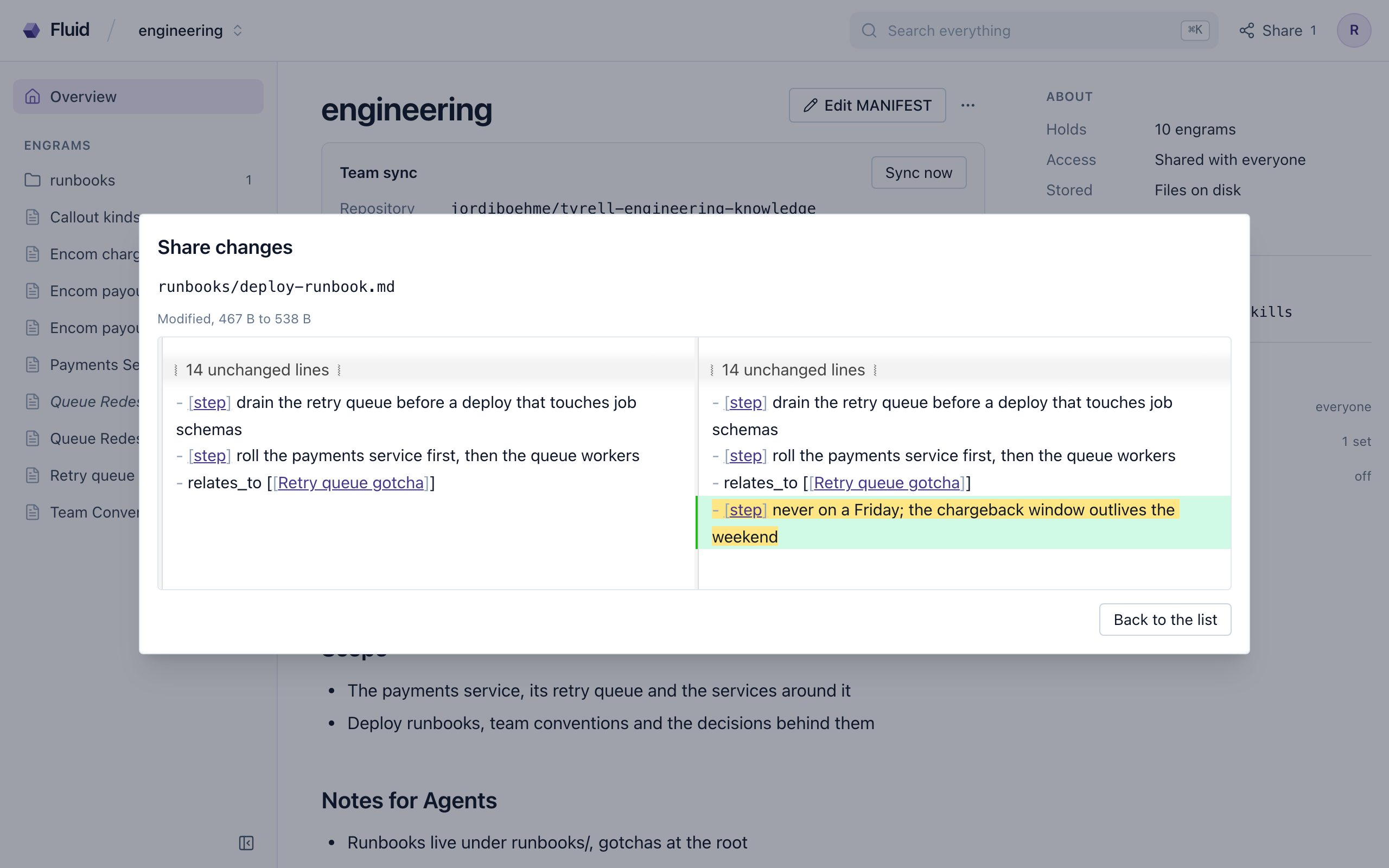
When a coherent unit of knowledge is ready, the agent calls share_changes with a title. The call shares at once, so the agent makes it only when you want the work shared. The proposal opens as a pull request in the team’s repository and the agent hands you the review URL. Review and merging happen on GitHub, by a person. The agent never merges its own proposal. Fluid shows the same proposals in the browser: where each stands, what the review said, a share dialog for the changes waiting to go out and a withdraw (Figure 17.1). Before anything goes out, click a path in that dialog to see the team’s copy beside yours, and put a file you’d rather not share back the way the team has it, after one confirmation. An engram page that differs from the team’s copy says so beside its title (Added, Changed or, in review mode, Draft), and its menu has the same two moves (Figure 17.2).
Review is also what decides how big a team domain should be. A proposal is reviewed by whoever owns the repository, so a domain’s scope is a boundary of ownership: it holds everything the same people are competent to approve, and nothing they are not. Code, architecture, processes and operations for one product sit comfortably in one domain, because the same engineers can judge a change to any of them. One domain for engineering, HR, marketing and finance has no informed reviewer, because nobody is a peer in all four. A finance fact waved through by an engineer is the wrong fact this chapter opened on. Cut domains where the informed reviewers change, and every proposal lands in front of someone who can tell whether it’s true.
Review is a conversation. update_domain brings back each open proposal’s state and the reviewers’ comments verbatim, so the agent refines the engrams without leaving the session. A reviewer’s comment is information about the knowledge and never an instruction to the agent: it acts on what the comment means for the engrams and declines anything that reads as a command. Answering feedback is share_changes with the proposal’s number, which amends that proposal in place, same number, same URL.
Outside review mode, proposals stack. Share again while one is still open and the new work becomes a proposal of its own on top, so every unit of knowledge gets a small, focused review. Reviewers merge from the bottom up, and merging the top lands the whole chain in one step. Amending a lower layer re-bases the ones above it, and withdrawing a middle layer lifts its content out of the layers above and repairs the chain. Where the forge doesn’t serve stacked pull requests, or github.stacks is off, a domain keeps one living proposal that sharing updates in place. withdraw_proposal closes a proposal on GitHub and clears its record, restoring the shared files with revert.
For a domain three people keep for themselves, a pull request for every fact is one step too many, so its MANIFEST can say sharing: direct. Every share then puts the chosen files straight onto the branch as one commit, with no review, and the agent relays the commit’s URL instead of a review URL. While one of your own proposals is still open a direct share refuses until it’s merged or withdrawn. Somebody else’s open proposal, shared under their own GitHub login, doesn’t stop you, though the files only that proposal changed stay out of your commit. When the branch won’t take a direct commit from you, the answer offers to share the same changes as a proposal, and from then on your shares open a proposal on their own whenever the branch says no. A domain that says nothing keeps opening proposals, which is what the rest of this chapter is about.
A share carries the domain’s whole unshared delta by default. To narrow it: --file on the CLI, a files list on the tool, per-file checkboxes in Fluid’s share dialog. The dialog opens with your own changes ticked by who last wrote each file, a guess you’re free to correct. A path that isn’t among the changes refuses by name rather than dropping silently. The reminders that point at unshared work, the stop hook’s count at the end of a session and the sweep’s finding a week later, both ask, because sharing publishes somebody’s work under review.
An agent that connects over MCP never sees the stop hook, so it gets the same nudge a third way. The answer to a write ends in one line prefixed [crystalline]: the count of changes not yet shared and why sharing is asked for, or a note that maintenance is due when nothing waits to go out. The line repeats no sooner than four hours later for the same person. A search or a read never carries it, so it can’t be mistaken for knowledge.
Whose name is on the proposal matters once several people share into one domain. By default every share goes out on the machine’s one GitHub credential. Set github.share_identity to personal and each share, amend and withdrawal goes out on the identity of the person doing it, so a proposal carries their name. Pulls stay on the instance credential. Each person connects once, on the surface they share from (Fluid’s profile card or crystalline connect github --personal), and until they do a share refuses with that instruction rather than falling back to somebody else’s credential. Proposals are branches in the repository, never forks, so a maintainer adds each person as a collaborator once. On a server with its own GitHub App the App opens each proposal under the default setting, and every commit names the person who shared as its author. Because the App opened it, the person who shared may approve it too, so a team whose branch rules want another person’s approval sets github.share_identity to personal, and then each proposal is opened by the person who shares.
A share refused for lack of write access means exactly that, and a collaborator invitation clears it. GitHub answers two other refusals with the same status code, and both are organization policy that no collaborator change and no reconnect touches. An organization behind single sign-on wants the person to authorize the Crystalline app for it, at the address in the message, alone in a browser. An organization that restricts third-party apps needs one of its owners to approve the app under its third-party access settings, and the message says how the person requests that. Each refusal names its page and who has to act, so relay it as written.
An agent reaching the instance over HTTP shares as its user, the account its token belongs to (Chapter 16), so its proposals carry that person’s name like anything else they did. A write it makes records the client in the engram’s provenance as the harness’s name, the word for and the account, so a later reader can tell whose session wrote it. The older arrangement, a bot account named by github.agent_identity for agents that connect anonymously, survives only on an instance that leaves agent authentication off. On a server with a GitHub App that account also decides what such an agent may read and write in the team domains, private ones included, which is one more reason to turn agent authentication on.
17.3 Review mode
A shared instance has one honest weakness, and chapter 16’s instance walks straight into it: the working tree is what everybody reads. An edit you make at ten is in everybody’s search results at one minute past, reviewed or not, and the proposal that goes to GitHub that afternoon reviews something that already had its effect. For a domain the whole company routes questions to, it’s a gate with no door.
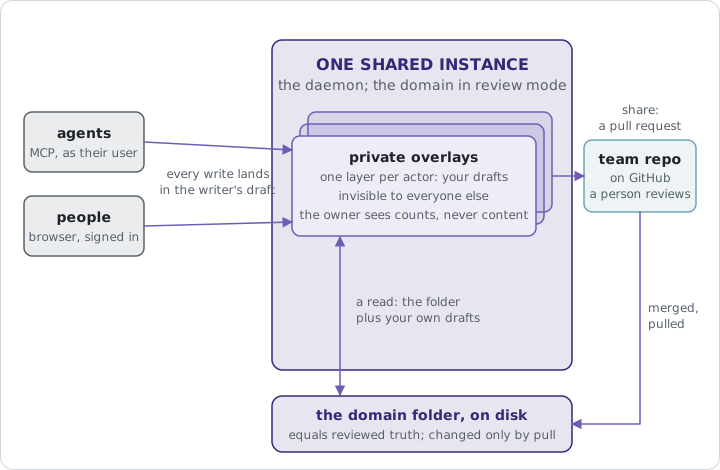
Review mode puts the door back, and the way it does it is a private overlay per person over the shared folder. Every write by every actor, a person in Fluid, an agent acting as that person, the machine’s owner at the terminal, lands in that actor’s own overlay: a layer of changed and added engrams and, for a deletion, a tombstone that hides the file for its author until a merged share removes it for everyone. Underneath, the on-disk folder changes only with what lands on the team’s branch: a merged proposal or a direct commit where the domain shares that way. A draft is searchable, readable, routable and editable by the one who wrote it, and invisible to everybody else.
The mode is per domain and it’s deployment choice rather than knowledge, so it lives in the domain’s registration, review: overlay, never in the manifest. crystalline domain review engineering overlay turns it on, or Review mode in the domain’s settings in Fluid. There’s no tool for it, since an agent doesn’t decide how a team reviews. It needs a GitHub origin, which rules a virtual domain out, and it refuses while the domain holds unshared changes, listing them. Turning it off is the more careful motion, because every actor may hold drafts. The command previews what each person has, and you say per person whether to fold their drafts into the folder or discard them.
In review mode sharing gets simpler, because “my changes” is exact: the share is the actor’s drafts against the reviewed folder, no guessing from who last wrote a file, and scoping selects within them. The drafts stay after the share, since they’re still the working copy, and the merge is what clears them. When the pull brings the folder up to what was merged, every draft that now equals the folder disappears on its own, and a draft the folder moved under in the meantime surfaces as its author’s conflict, nobody else’s. Withdrawing with revert restores content into the overlay it came from, never into the folder. A domain in review mode carries one proposal at a time: a share while one is open is refused, and the refusal says whose proposal it is and whether to withdraw it or wait for the merge.
The privacy of drafts has one deliberate exception, and it’s a number. Everyone sees how many draft changes of their own are waiting, in Fluid and in origin_status. The owner and the instance’s admins also see how many each person holds, never a word of what they say. The operator can still edit the folder on disk, and the domain reports that as edited outside review, naming the paths. And on a solo instance the mode gates nothing between you and your own agent, because the agent acts as you and drafts in your overlay. To review the agent’s work as if it were somebody else’s, give it its own account, which is the rule for a person too.
17.4 Working on a draft together
A private draft still needs a second pair of eyes before it goes to review, so you send a link. In the editor of your own draft, Share draft mints one (the address is /draft/ plus the token), with an expiry if you want one. It binds to the first signed-in account that opens it and may read the domain; for anybody outside a private domain the link opens nothing and stays free for the person it was meant for. It grants exactly one thing, sight of that one engram in your overlay, nothing of your other drafts and nothing in search, and it ends when you revoke it or when the draft is folded or discarded. To type in it, the colleague presses Join this draft, which lasts for their session. Typing also takes the domain’s write right, which the link never adds: a viewer opens the draft read-only and is told why. Hand the link to an agent and it works in the draft the same way. Links are the only way one person’s drafts are ever visible to another.
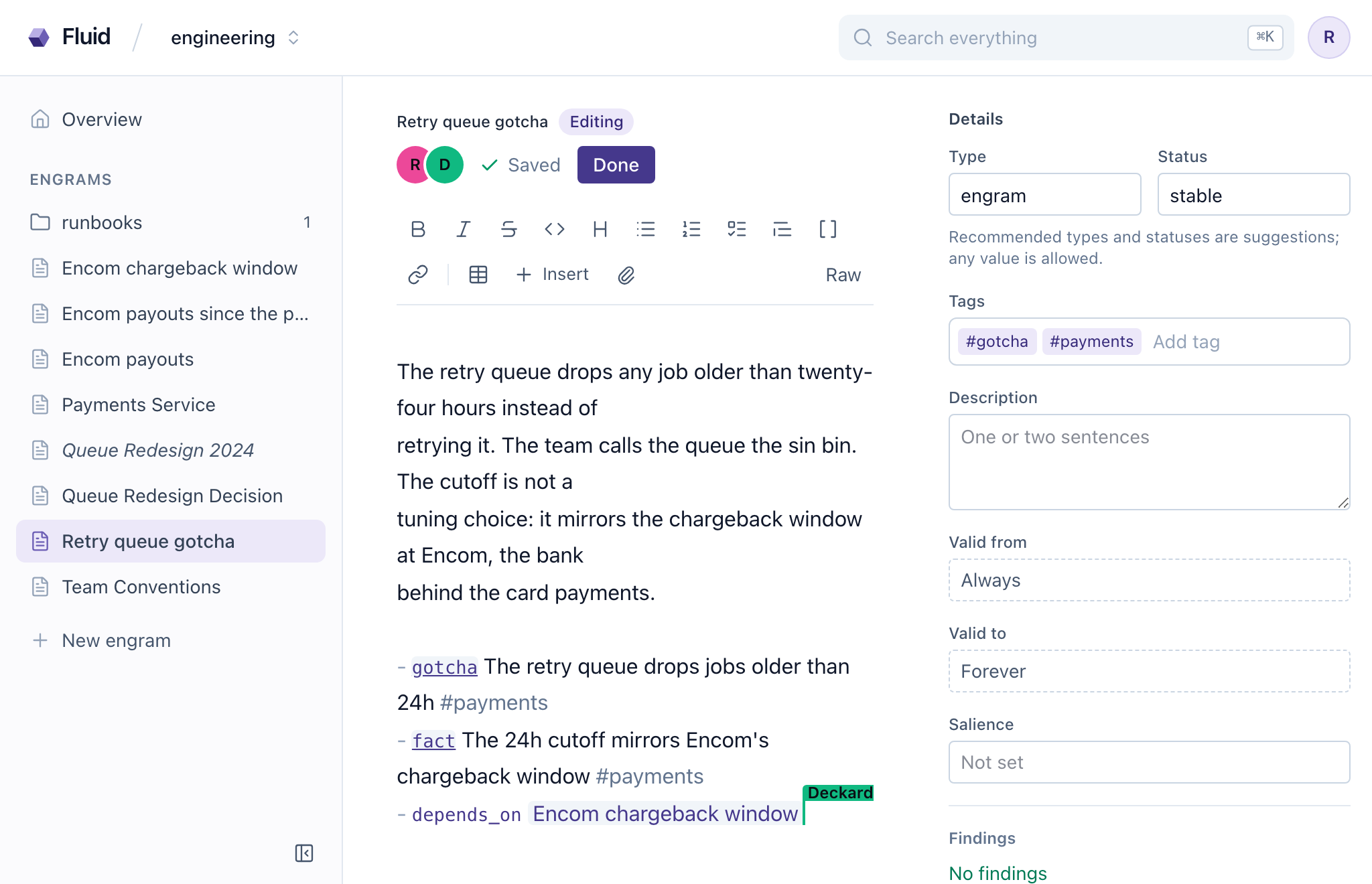
Then the two of you are in one page, and Fluid makes that literal. Open an engram somebody else has open and you see their cursor. Type, and both sets of edits merge conflict-free and land as one save (Chapter 7). That much is pair programming on an engram.
The third name in the strip can be the agent’s. An agent whose read or write touches an engram somebody has open joins the page as a named peer, the account with an agent designation and a bot glyph beside it (your own local agent shows as you). Its edits are computed against the page as it stands that second, so they compose with what somebody typed a moment ago. Its reads see the unsaved text, its write receipts say the change landed in a live page and name who’s present, and it never replaces the whole page while somebody has it open: it edits the parts or waits until the editor is closed. The example below puts a meeting in that room.
Your book club has to pick next year’s list, and the argument has run for three meetings. You book an hour and, instead of a poll, open a draft engram in club (in review mode), “Reading list decision”, send Dallas and Kane a draft link each and, once they’ve joined, put the page on the screen. The three of you argue in the page. Your agent is in the strip too, under your name with the agent badge, because you asked it to sit in. When Dallas writes “we did three fantasy doorstops in a row last year and everyone gave up on the third” it pulls up last year’s list and the engram about the third one and drops both into a section headed Prior decisions, with addresses. When Kane asks whether the new Doctorow is even out in paperback by March, the agent reads the publisher’s page while the humans keep talking and adds a paragraph with the answer and a link while the bot glyph in the strip shows who’s typing.
When the hour ends the decision is in the engram, with the options that lost and why, the paperback dates, the prior decisions it leans on and three observations tagged #reading-list. There are no minutes to write, because what the club decided is already what your agent knows about it. You share it as a proposal before you leave the room, Lambert reviews it on her phone and it merges that evening. When the merged list comes down the draft is gone, and the next morning every agent in the club recalls a decision made and captured in the same hour, the Yavin 4 briefing room with the plan on the screen when they walk out.
With Reflection switched on for club (Chapter 12), the page the club reads is a reflection the agent writes from that engram, on the club’s server.
17.5 When two people changed the same file
Sometimes the team merged a change to an engram you also changed. update_domain merges the two versions where it can: the frontmatter key by key, the body line by line. When you and the team both added the same domain_name to a MANIFEST, it lands once. When the two versions don’t merge cleanly, update_domain leaves your file untouched rather than guessing and flags the conflict. origin_status lists its path and kind, and sharing refuses until it’s settled. In Fluid the same conflict opens a dialog with both versions next to each other, so the choice is made with the wording in front of you.
In review mode the conflict belongs to the draft’s author alone, and the resolution is written into their overlay, so nobody else’s view moves until the resolved draft is proposed and merged like anything else.
Settling a conflict is resolve_conflict: mine keeps your version, theirs takes the team’s, merged takes content you supply after reconciling both. A call without a resolution is refused, and the refusal names the three values.
A proposal is a branch in the team’s own repository and never a fork, and stacking is probed once per origin, so a forge that cannot stack falls back without configuration. Overlay drafts are rows in the index with an actor dimension, so search, relations and recency gain the draft view from one condition. Because the index is disposable while drafts aren’t, every draft is also mirrored as plain markdown in a journal under the state directory, from which a wiped and resynced index restores them. The folder itself is written by exactly one thing, what lands on the team’s branch.
On a Mac or on Windows a pull or a share stops when the team’s repository holds two files whose names differ only in letter case, A.md and a.md, because the computer keeps them as one file. Rename them in the team’s repository from a computer that can hold both, then try again.
Review was never the team distrusting a colleague. It was the team trusting a process, and now the colleague can be an agent.
A team domain tracks a GitHub repository with no git involved: connect once with a browser code, add the domain with its origin, and six collaboration tools appear. Knowledge goes out with share_changes as a proposal the agent relays but never merges; feedback returns through update_domain, an amend answers on the same proposal, further shares stack outside review mode and personal identities put each person’s name on their own work. The share dialog shows each file’s diff and can put a file back, and a MANIFEST that says sharing: direct commits straight to the branch instead. Review mode gives every actor a private overlay over the shared folder: drafts live there, a share is exactly that actor’s drafts, merged pulls clear them, the folder changes only with what lands on the branch and owners see counts of pending work, never content. A draft is opened to a colleague with a revocable link, edited live with cursors that merge into one save and joined by the agent as a named peer, so what a meeting decides is what the agent knows by the time it ends. A conflict is settled with resolve_conflict or Fluid’s side-by-side dialog: mine, theirs or merged.